
Add a Metal Price Bar to the Website
This article helps you add a Metal Price Bar to your website. The Metal Price Bar informs your customer about the prices of the metals sold on your website. This helps in improving customer trust and transparency.
The prices on the Metal Price Bar are linked to your metal prices on the Dashboard.
For the Basic & Starter plans, the prices will be updated only when the prices are refreshed on the Dashboard. For the Advanced plan, the prices will be updated automatically by the application at regular intervals.
Please follow the below steps to add the Metal Price Bar.
- Go to Shopify Admin → Online Store.
- On your live theme, click on ‘•••’ and select Edit Code.
- Under Sections, click on the Add a new section option.
- Enter the name of the file as ‘metal-price-bar’ and click Done.
- Below, select the metals to show on the bar (up to 4), the weight the prices are shown per and the default colors, then click Generate Code.
- Copy the generated code and paste it into the newly created file.
- Click on Save to save the code.
- Now navigate to Shopify Admin → Online store and click on the Customize button.
- Add the Metal Price Bar section to the Header of your website.
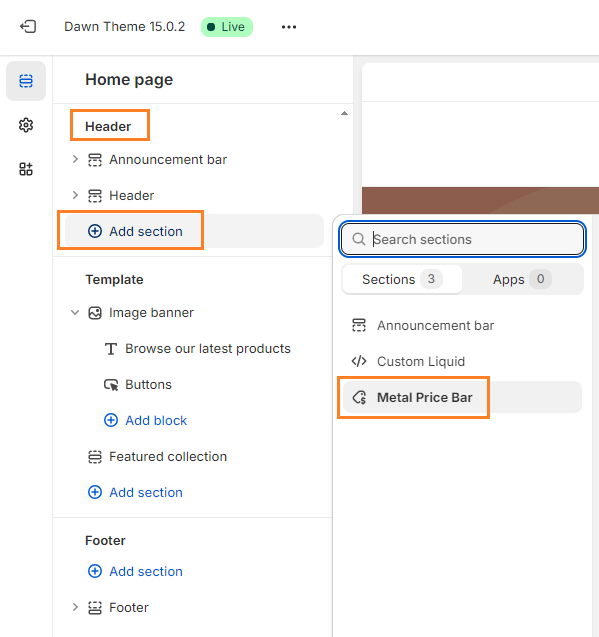
- You can customize the background and text colors on the Template Editor.
- Once done, click on Save to save the changes.
For assistance or further customization, please contact our support.
Still need a hand?
Our team will help you with setup, formulas and custom requirements.