
Add a Price Breakup Section to the Product Details Page
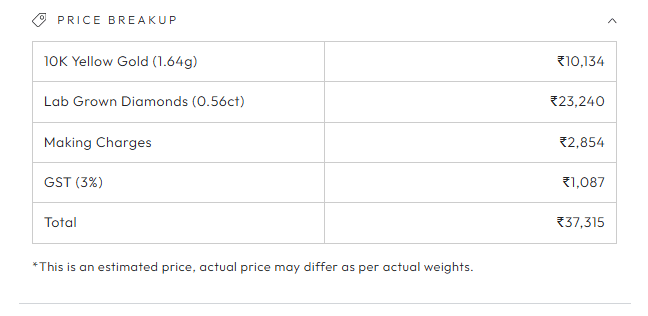
This article helps you add a Price Breakup section to the Product Details page of your website. The Price Breakup section shows your customers an itemised breakdown of the product price. This helps in improving customer trust and transparency.
The Price Breakup section is available on the Basic & Advanced plans.
Basic Plan
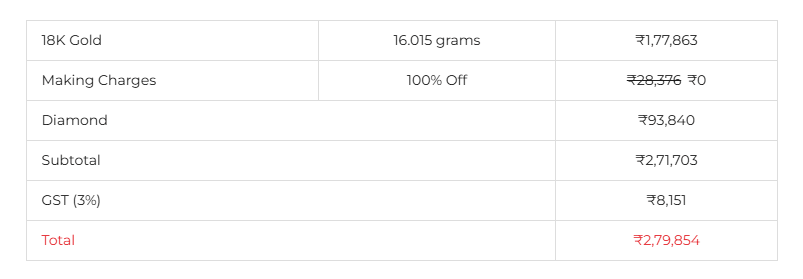
On the Basic plan, you can display a Simple Price Breakup section on the Product Details page.
Advanced Plan
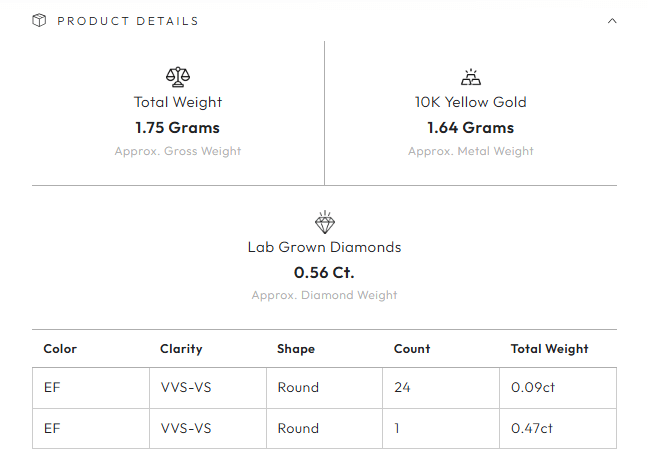
On the Advanced plan, you can display a detailed Product Details & Price Breakup section on the Product Details page, with:
- Gross Weight
- Detailed Diamond Classification with custom logic
Get the Section Set Up
Both options are set up for you by our development team, using collaborator access to your store. The section cannot be added from the application, so please contact our support team to get it set up.
- Contact our support team from the contact page, with your MyShopify domain and the plan you are on.
- Our development team will send a collaborator access request to your store. Please approve the request.
- Our development team will set up the Price Breakup section on your Product Details page, styled to match your store’s branding, and test it with different product configurations.
Still need a hand?
Our team will help you with setup, formulas and custom requirements.